Your Chance to Help Improve Tennisplayer

Collapse
X
 
  • Time
  • Show
Clear All
new posts
  • ralph
    • Apr 2005
    • 100

    #346
    I guess dream contributors would be Gil Reyes or Marco Panichi. I, also, listened to a podcast titled Tactical Tennis. The two hosts, Glen Hill and Jacob Meyer, seemed to be knowledgeable. Or, perhaps an athletic trainer from a top ranked D1 school in your area.

    Comment

    • John Yandell
      Senior Member
      • Feb 2005
      • 6883

      #347
      Yeah...but...I will keep my eyes open...

      Comment

      • ralph
        • Apr 2005
        • 100

        #348
        Doing some research just came across a presentation by Brent Salazar, the head trainer for the USTA. Incredible background. Thanks for responding.

        Comment

        • John Yandell
          Senior Member
          • Feb 2005
          • 6883

          #349
          OK good idea.

          Comment

          • glacierguy
            Senior Member
            • Dec 2017
            • 411

            #350
            Hi John, prompted by the latest "Serve - where are we now?" article, I was looking at Justine Henin's serve in the original Stroke Archive (really lovely action), and was wondering if it were possible to extract a slow motion from the original low frame rate footage. So I googled "interpolate slow motion from video with low frame rate" - and apparently it can be done. Don't want to advertise here. Thought you might experiment and see what you think? Could add value to the original archive?

            Comment

            • John Yandell
              Senior Member
              • Feb 2005
              • 6883

              #351
              Yeah that would be great. Why don't you experiment and see if it works and report back?

              Comment

              • glacierguy
                Senior Member
                • Dec 2017
                • 411

                #352
                Ha ha!, maybe I will, but my initial thought was that I couldn't afford to pay for Adobe Premiere!

                Comment

                • John Yandell
                  Senior Member
                  • Feb 2005
                  • 6883

                  #353
                  Oh you need that? I actually don't have it either. There are some Justine serves in the high speed archives though.

                  Comment

                  • jimlosaltos
                    Senior Member
                    • Jan 2011
                    • 4151

                    #354
                    Originally posted by glacierguy
                    Ha ha!, maybe I will, but my initial thought was that I couldn't afford to pay for Adobe Premiere!
                    Well, Premiere is $20.99/ mo but Apple's Final Cup Pro (FCPX) is $299.99 to purchase, and can pretty much all the same things. Tastes dictate which some like.

                    You might be able to do this in iMovie, which is free on the Mac, if you keep it simple. But I have not touched iMovie in decades, so don't take my word.

                    The barrier to learning FCPX is significant, tho.

                    But for what you're interested in doing, the steps in FCP would be fairly straightforward:

                    1) In the Libraries Sidecar (box in upper left where media you imported to use in videos resides) select the range you want to slow down.

                    2) Drag that into the time line.

                    2 b ) {Alternate, to select a range within a longer video that is already in the timeline to slow, use the Range Selection Tool. Command-R, I believe, or its on the pull down under the selection tool (Arry, with down carrot middle left of screen.

                    3) Right in the middle of your screen will be an icon that looks like a speedometer. Set the speed in % of original that you want to play that at.

                    Presto! Done.

                    Years back, when I did something like this, I also found "Freeze Frames" handy. Creates a nice stop-action effect to emphasize individual steps. Put cursor over the frame you want to freeze. Go to the top menu Edit/ Freeze Frame.
                    Last edited by jimlosaltos; 06-13-2022, 09:34 AM.

                    Comment

                    • John Yandell
                      Senior Member
                      • Feb 2005
                      • 6883

                      #355
                      OK Jim...

                      Comment

                      • jimlosaltos
                        Senior Member
                        • Jan 2011
                        • 4151

                        #356
                        Originally posted by jimlosaltos

                        Well, Premiere is $20.99/ mo but Apple's Final Cup Pro (FCPX) is $299.99 to purchase, and can pretty much all the same things. Tastes dictate which some like.

                        You might be able to do this in iMovie, which is free on the Mac, if you keep it simple. But I have not touched iMovie in decades, so don't take my word.

                        The barrier to learning FCPX is significant, tho.

                        But for what you're interested in doing, the steps in FCP would be fairly straightforward:

                        1) In the Libraries Sidecar (box in upper left where media you imported to use in videos resides) select the range you want to slow down.

                        2) Drag that into the time line.

                        2 b ) {Alternate, to select a range within a longer video that is already in the timeline to slow, use the Range Selection Tool. Command-R, I believe, or its on the pull down under the selection tool (Arry, with down carrot middle left of screen.

                        3) Right in the middle of your screen will be an icon that looks like a speedometer. Set the speed in % of original that you want to play that at.

                        Presto! Done.

                        Years back, when I did something like this, I also found "Freeze Frames" handy. Creates a nice stop-action effect to emphasize individual steps. Put cursor over the frame you want to freeze. Go to the top menu Edit/ Freeze Frame.
                        You can probably get this done in the much-easier-to-use iMovie on the Mac or whatever is today's equivalent on Windows 10. I haven't used either in decade.

                        Quick search on iMovie:

                        https://support.apple.com/guide/imov...0Auto%20button.

                        Any part of a clip can be sped up or slowed down, and you can choose whether to smoothly transition the frame rates between the part with the speed change and the rest of the clip.
                        1. In the iMovie app on your Mac, select a range in a clip in the timeline by holding down the R key and dragging across the clip.
                        2. To show the speed controls, click the Speed button.

                        3. Do one of the following:
                          • Slow down the selected part of the clip: Click the Speed pop-up menu and choose Slow.

                            By default, the speed is set to 50%, but you can click any speed button.
                          • Speed up the selected part of the clip: Click the Speed pop-up menu and choose Fast.

                            By default, the speed is set to twice normal speed (2x), but you can click any speed button.
                          • Set a custom speed for the selected part of the clip: Click the Speed pop-up menu, choose Custom, and type a number in the field.

                            The speed change is applied to the selected range, and speed sliders appear above the selected range and any areas of the clip outside the selected range.
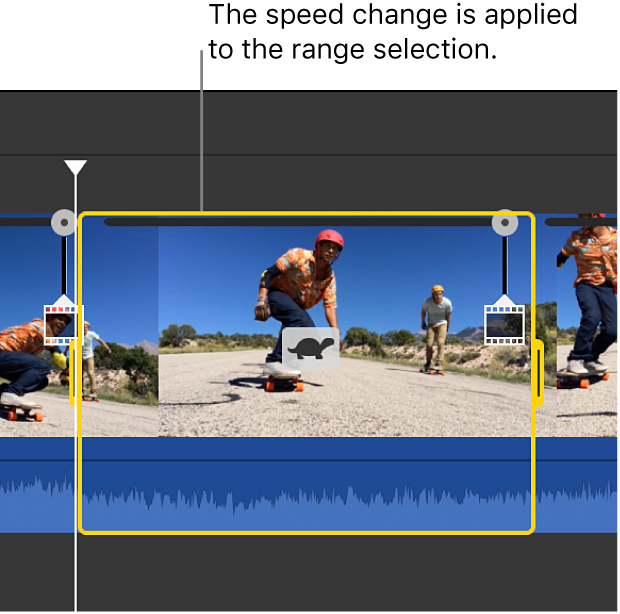
                          When you play back the clip, it begins playing at normal speed, then changes to the speed you set, then returns to normal speed again at the end of the clip.
                        4. To have the speed changes occur gradually, select the Smooth checkbox.
                        5. To adjust the speed of the selected range or an area outside it, drag any of the three speed sliders at the top of the clip.

                        Comment

                        • John Yandell
                          Senior Member
                          • Feb 2005
                          • 6883

                          #357
                          i movie works beautifully. all this above is way too complex for humanity.

                          Comment

                          • jimlosaltos
                            Senior Member
                            • Jan 2011
                            • 4151

                            #358
                            Originally posted by johnyandell
                            i movie works beautifully. all this above is way too complex for humanity.
                            It's all relative, John.

                            Imagine a skilled video editor trying to learn tennis and hearing "External shoulder rotation followed by internal shoulder, Kinetic chain ..."

                            It would be enough to make him take up pickelball

                            Comment

                            • John Yandell
                              Senior Member
                              • Feb 2005
                              • 6883

                              #359
                              Yeah ok sure.

                              Comment

                              • dimbleby69
                                • Jan 2020
                                • 56

                                #360
                                Hi John,

                                couldn't get directly onto Scott Murphy>The Opposite Arm Groundstrokes, in Classic Lessons. Comes up with a Not Found message and "Apache/2.4.41 (Ubuntu) Server at www.tennisplayer.net Port 443".

                                The link to it from 'The Opposite Arm: Part 2' does work.

                                regards
                                Rob

                                Comment

                                Who's Online

                                Collapse

                                Working...